
How to collect photo publication consents in kindergartens and schools? New Mafelo features
If you photograph kindergartens, schools, proms, sports competitions or dog shows, you probably know this scenario. You take great photos, you want to show them in your portfolio or on Instagram… and that's where the problem starts. Publication consents had to be collected separately. Usually on paper, sometimes in messages, and quite often not at all, because the excitement after the session had already faded and nobody had time for formalities.
Over the past few months, dozens of people have written to us about this. The questions were always similar: "When will consents be available in public galleries?", "Are you planning this feature at all?". Today we can answer: yes, and we've just launched it!
In this article we'll show you three changes that have arrived in Mafelo:
- publication consents in public galleries – the client gives them right after placing an order, and you manage them in the photographer's panel,
- galleries without a password – access to a public gallery without entering a password, perfect for sharing photos from events,
- forced change of person for the next order – no more mixed-up orders when one person orders for several families on the same computer.
We also show all three features in the video:
Why are publication consents so important for a photographer?
Your portfolio is your most important sales tool. New clients choose you based on what you have already done, not on what you promise. The problem is that photos from group sessions show children, students or event participants. Without consent, you can't show them on your website or on social media.
In private galleries, we solved this some time ago. The request for consents appears at the moment when the client is happiest – right after placing an order. The result? Before this change, 19.9% of clients gave their consent; after it, 52.9%. That's more than 2.5 times as many people allowing you to show your work.
We knew that the potential in public galleries was even greater. One kindergarten session means dozens of orders, and therefore dozens of potential consents that until now could not be collected in Mafelo. Now they can!
Consents in public galleries – how does it work?
The whole process works in the same way as in private galleries, so if you already use consents, you don't need to learn anything new.
1. The client places and pays for an order
After paying for the order, the client sees a thank-you screen with a short, friendly request: "Want to help me grow? Take a moment to choose your publication consents". They can go to the consents right away or choose "Maybe next time". No pressure, no formal tone.
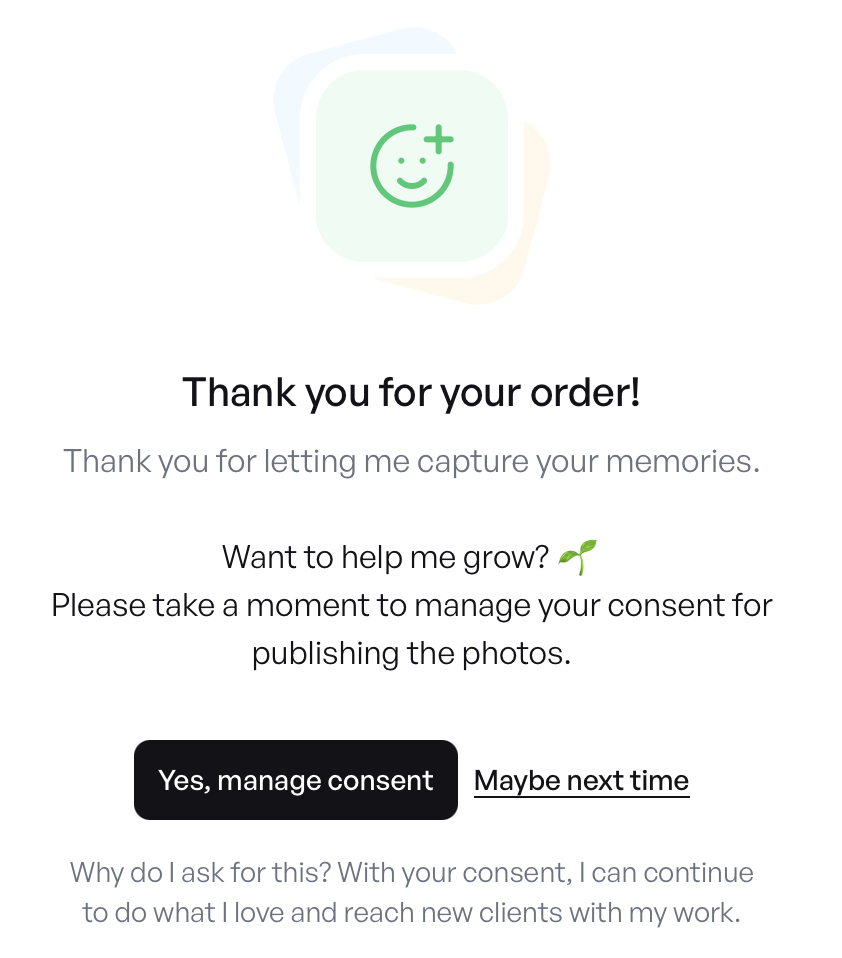
This page doesn't look the way it does by accident. Every element is based on what social psychology knows about decision-making and influence. And that's exactly why it works.
Timing matters
A client who has just chosen and paid for their photos is at an emotional "high" – they're happy to have a keepsake and they're thinking of you positively. In that state, we are much more likely to say "yes". The same form sent by email three weeks later reaches a person who has returned to everyday life and treats it as just another chore. This is exactly the difference behind the increase from 19.9% to 52.9% in private galleries.
"Want to help me grow?" instead of "I consent to the processing of…"
A client who has just received something from you naturally feels the need to give something back. This is one of the strongest rules governing our relationships – the rule of reciprocity. A question phrased as a request for a small favour gives them an easy opportunity to return the gesture. A formal clause doesn't offer that opportunity – it sounds like a document to sign, not like a gesture towards a specific person. Such wording also changes the client's role: from "a person something is being demanded of" to "a partner who supports someone's passion". And people are happy to act in line with the role they see themselves in.
Explaining "why" increases the chance of consent
Below the buttons, the client reads: "Your consent will help me develop my passion and reach new people with beautiful photos". This matters more than it seems. Research shows that simply giving a reason for a request – even a very simple one – clearly increases the number of people who fulfil it. A request without a reason raises the question "what does he need this for?"; a request with a reason answers it immediately.
The "Maybe next time" option is just as important as the "Yes" button
When someone feels they are being forced into something, a natural resistance kicks in – they want to regain a sense of control and more often refuse precisely because they had no choice. Psychologists call this reactance. A visible, easily accessible option to decline removes that pressure. Paradoxically, when you give someone the freedom to say "no", you hear "yes" more often. The phrase "next time" does one more thing: it doesn't close the topic. The client isn't refusing, only postponing the decision, so a later request from the photographer's panel isn't perceived as pushing.
In short: good timing, a request instead of a demand, a clear reason and a real option to decline. Four simple elements that together make the client give consent willingly, not under pressure. This matters for you too, and not only because such consent lasts longer and doesn't come back as complaints after publication. Voluntariness is one of the basic conditions of valid consent under the GDPR – consent that is forced or given under pressure can be challenged. A page that gives the client a real choice and doesn't punish a refusal therefore helps you collect consent that is much harder to dispute.
2. The client selects the consents and adds a comment
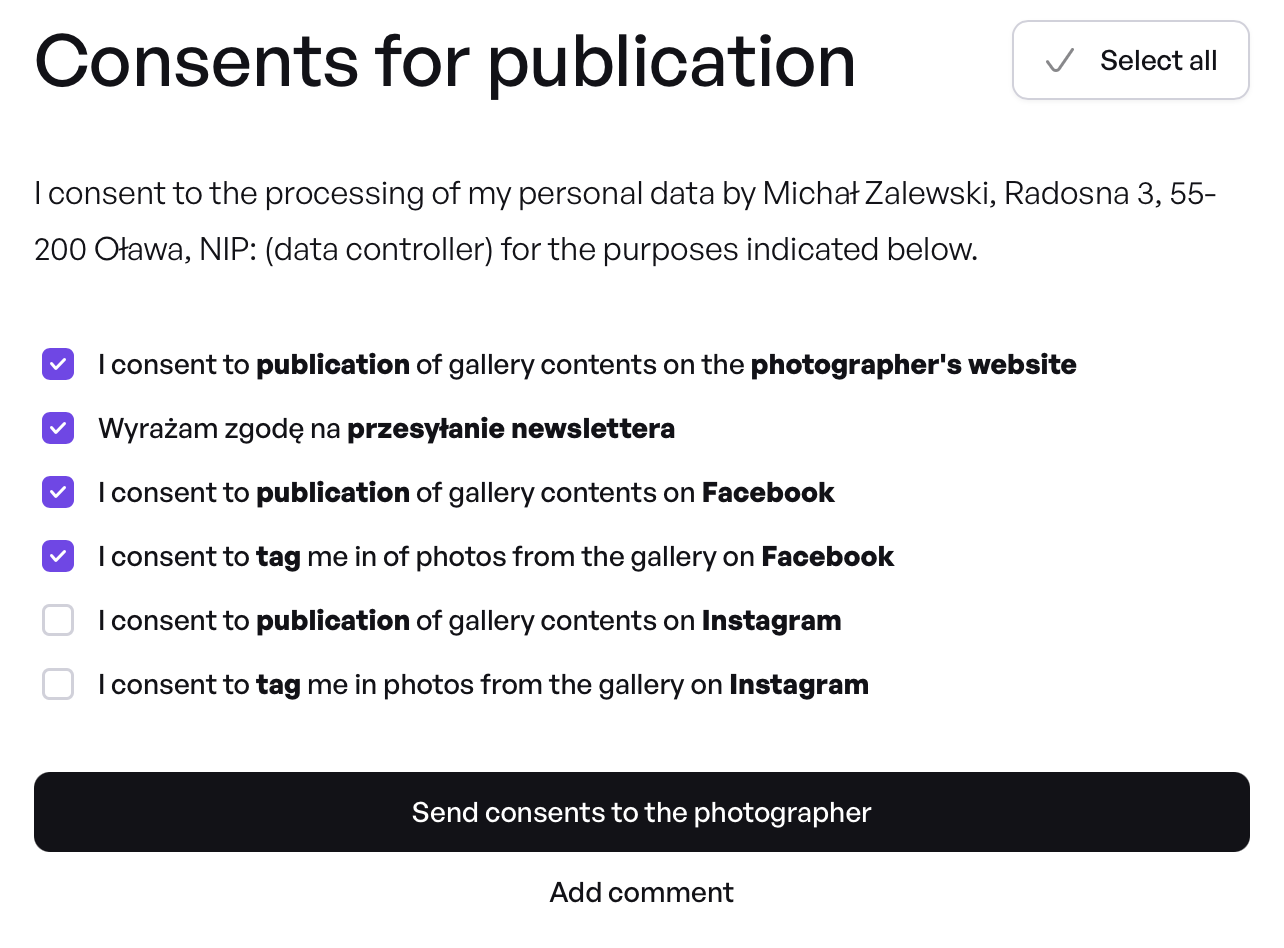
In the form, the client sees a list of consents that you configure yourself in the settings, e.g. publication on your website, newsletter, publication and tagging on Facebook or Instagram, or any other consents you add. They can select all of them with one click or choose only some.
The client can also add an optional comment to the consents, e.g. "Please let me know when the photos are published on Facebook, I'll happily share the post".
3. You see the consents in the photographer's panel
Consents from a public gallery are available in two places:
- on the order list – next to each order you see the status: Consents received, Consents requested or No consents; clicking the status shows the details and the client's comment,
- in the new "Consents" tab – a summary view of all consents in a given public gallery, showing which consent was given and when.
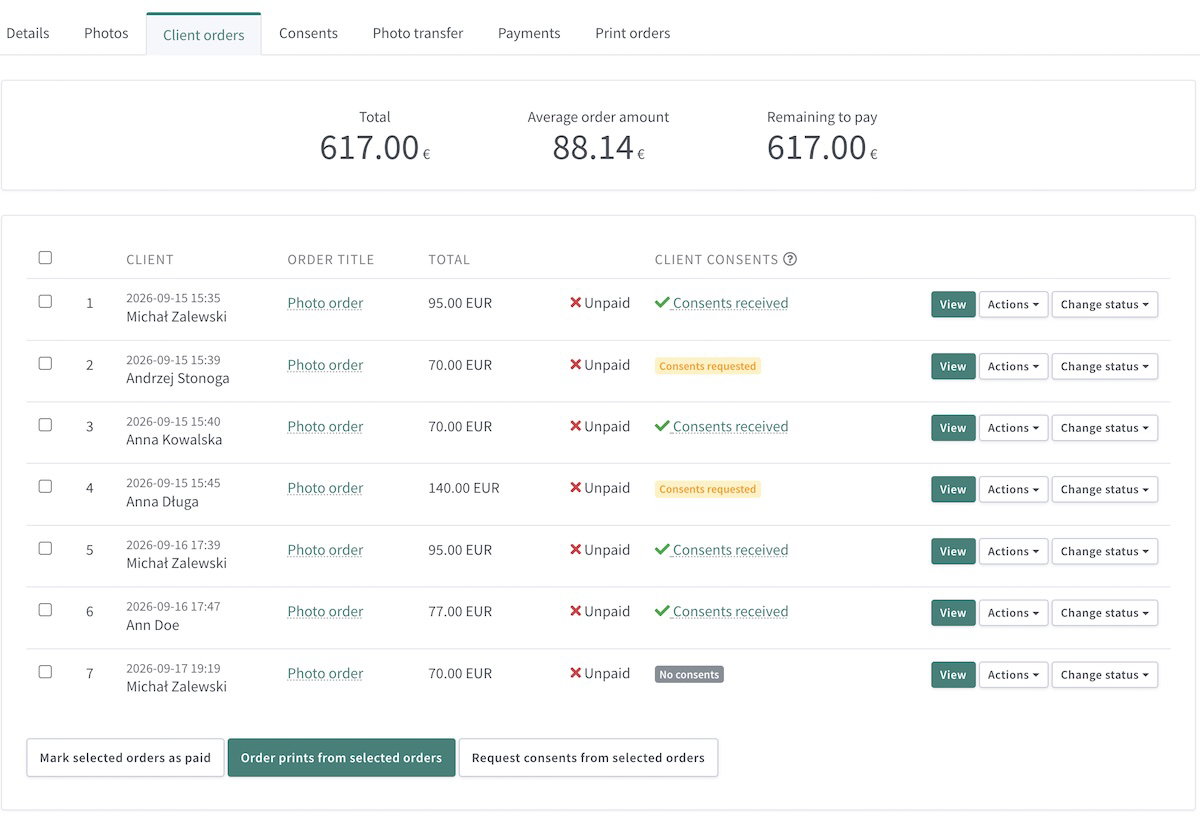
Order list
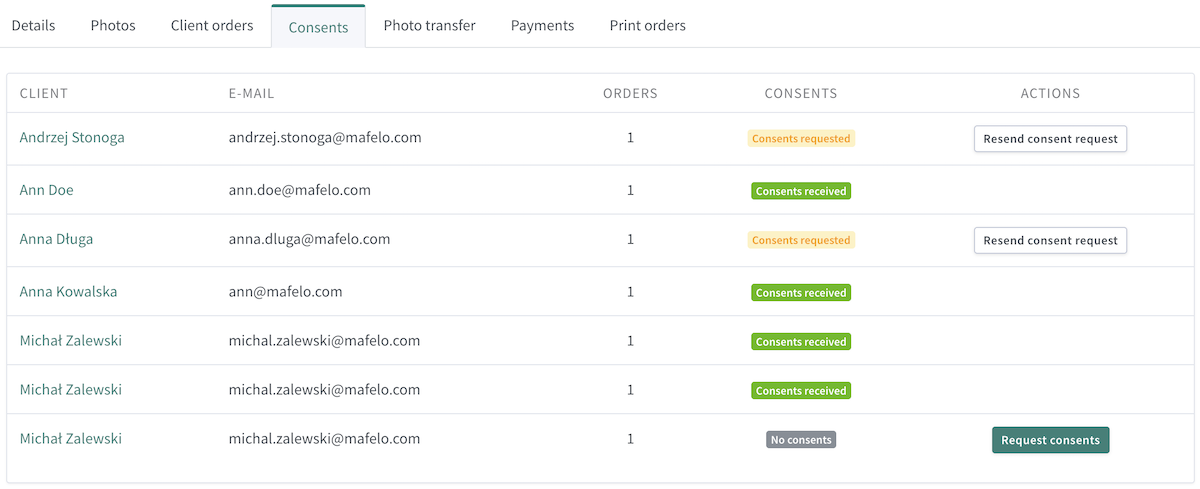
List of consents in the "Consents" tab
4. You ask for consents from those who haven't given them yet
Not every client will fill in the form right away. That's why you can send a consent request from the order list: to one person via the Actions menu, or in bulk – select any number of orders (even all of them) and click "Request consents from selected orders".
The system makes sure nobody gets spammed:
- it skips clients who have already given consents,
- it skips clients who have already been sent a request.
Before sending, you'll see a summary and information about which clients will receive the consent request. You can add your own message to the request. After clicking the link in the email, the client receives a form identical to the one shown after ordering and can select what they agree to and what they don't.
Galleries without a password – access for every event participant
The second change you asked for: public galleries shared without a password.
For event sessions – proms, sports competitions, dog shows, fairs – the password was often more of an obstacle than a safeguard. The link reached hundreds of people anyway, and every "what was the password?" meant another message to reply to.
Now the client simply opens the link and clicks "View gallery". Before seeing the photos, they'll see your welcome message and price list. In addition, a request to respect copyright will be displayed, which they must confirm (this requires enabling the feature in the given gallery). Only then do they enter the gallery.
Importantly, a gallery without a password doesn't mean a gallery without protection. All Mafelo safeguards still work in it, including screenshot blocking – instead of a screenshot, the client will see a message with your logo and information about who owns the photos. If you don't use this option yet, we encourage you to read the article: Preventing screenshots in galleries.
When is it worth turning off the password?
Wherever you care about the widest possible reach: the fewer barriers between an event participant and their photo, the greater the chance they'll order it. Of course, remember about the applicable image rights protection, especially for photos of children, and the regulations on personal data protection.
Changing the person for the next order
The third change solves a problem well known to kindergarten and school photographers. One person – a teacher, a mum from the parents' committee or a student – places orders for several families on the same computer.
Until now, after the first order you could simply enter a new first name, last name and email in the form and place another one. This sometimes caused quite a lot of confusion, e.g. when many people chose the group photo.
Now it works differently:
- After placing an order, the client's details (first name, last name, phone, email) are locked in the form and can't be edited. Of course, the client can still place another order with the same details.
- To place an order as a different person, you need to click "That's not me".
- The system informs you that the previous person will be logged out and the cart will be recalculated from scratch – each photo is counted from the first item of the price list.
- The new client enters their details, pays for the order and… can immediately give their publication consents.
As a result, each person has their own separate orders, sees only their own purchases in the gallery, and you have clean data in the panel: who ordered what and for how much.
How to use these changes in practice?
The new features aren't just about convenience. They have a real impact on your marketing and sales.
- Collect consents at every public gallery. Even if you're not planning to publish anything today, a consent collected now will come in handy in six months, when you're building your offer for the next school season.
- Don't forget the reminder. After sales in a gallery have ended, select all orders and send a bulk request. The system will automatically pick only those people who haven't responded yet.
- Read your clients' comments. You'll often find ready-made ideas for collaboration in them – someone will happily share your post, someone will ask to be tagged. That's free reach.
- Turn off the password where reach matters. Event galleries should reach as many participants as possible – of course, pay attention to the legal aspects of sharing people's images. The photo safeguards stay in place.
- Plan kindergarten sessions with group orders in mind. Since the system keeps orders separate, you can safely use progressive price lists (more expensive first photos, cheaper subsequent ones).
Summary
Publication consents in public galleries were one of the most anticipated Mafelo features, and we're glad we can finally put them in your hands. The client gives consent at the best possible moment – right after ordering – and you have everything organised in one place, with the option to send a reminder with a single click.
Galleries without a password will make selling event photos easier, and the forced change of person will keep group orders in order. All three features are already available on your account.
Let us know how they work for you. Your messages are the reason this feature was created, and they determine what we work on next.

Co-founder of Mafelo. He listens closely to the challenges facing the photography industry and analyzes them in detail to get to the heart of the issues. This allows him to create solutions that make photographers' daily work easier—something that gives him the greatest satisfaction.
You might also like
A photographer's digital products. Why don't they sell themselves?

How to collect customer reviews? A guide for photographers
Pinterest for a photographer: an underestimated source of clients and website traffic