
Sorted bulk orders
Are you tired of manually sorting thousands of prints after large photo sessions? If you take photos in kindergartens, schools, or similar places, you probably know this scenario well: you finish the session, everything looks great, and then... the hard work begins. Orders from parents come in one by one, and you sit with a mountain of prints, trying to sort everything so that no one gets the wrong photos. Time runs out, frustration grows, and satisfaction – well, it could be better.
As one of our clients put it: "These are thousands of prints manually sorted every year... kindergartens alone are at least 8,000 - 10,000 prints processed by hand." That is a huge amount of work. Anyone who works on such sessions knows how much time and energy this logistical chaos can consume.
Fortunately, we have something that can completely change your daily routine – bulk packing of photos in Mafelo. This is a feature that delivers photos to you already sorted – packed separately for each client, ready to hand out. No more mistakes that can negatively affect the professional image of your photography brand. Sounds like a dream? Keep reading – we will show you how this option works, why it is worth using, and how it can change your approach to processing orders after large sessions.
What is bulk packing?
Bulk packing is a feature that can revolutionize the way you deliver photos to your clients. In short: it allows you to send many orders to the printing lab "in one go", with a clear instruction that each of them should be packed separately. What does this mean in practice?
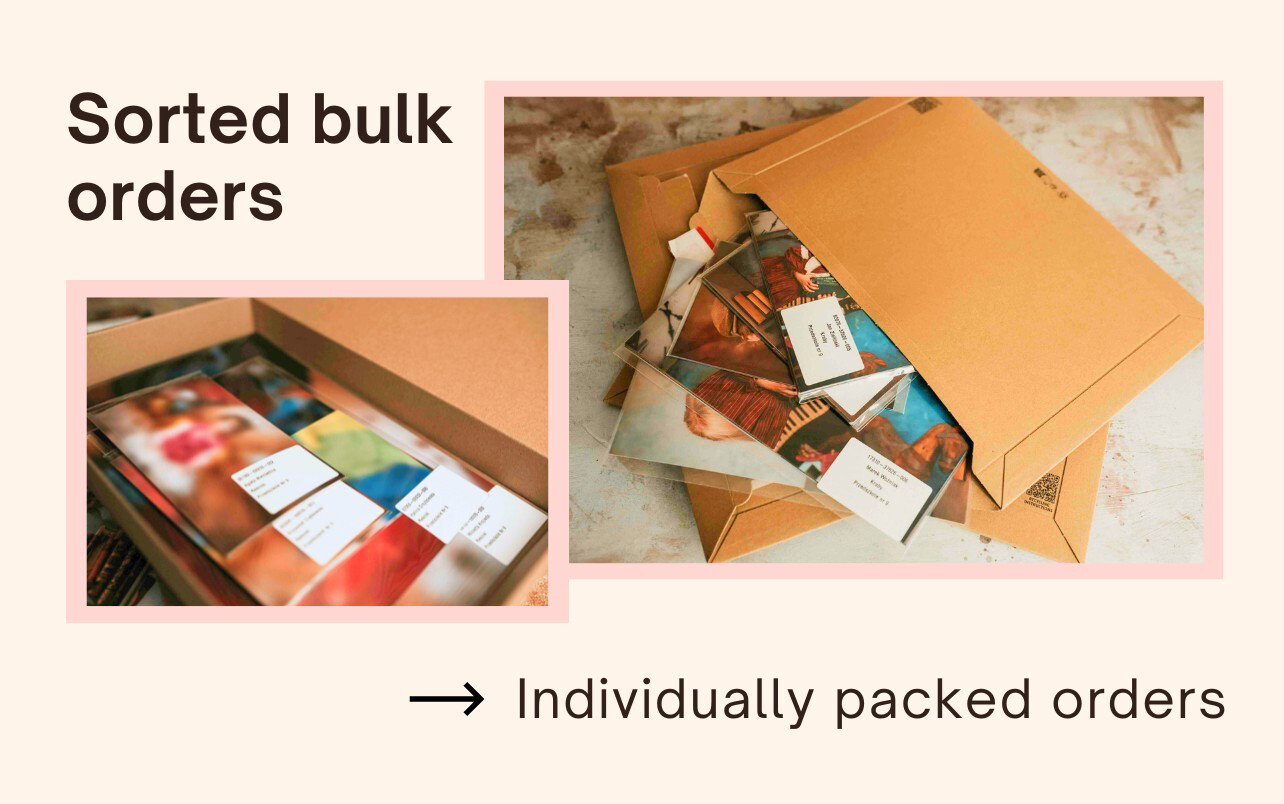
Instead of receiving one big box with mixed prints from dozens (and sometimes even hundreds!) of orders, you get a package where everything is already sorted and packed.
Each individual order is labeled separately.
Groups or classes are packed in separate envelopes.
Everything is delivered to you in a clearly labeled bulk box.
This organization saves not only your time but also your nerves. Thanks to bulk packing, you don't have to spend hours matching photos to specific orders, you avoid mistakes and errors, and the whole process looks much more professional to your clients.
This is a really big change – especially if you serve larger schools or kindergartens, and orders reach dozens or hundreds of prints. In such cases, manual packing is not just a waste of time, but also a big risk of chaos.
Benefits of bulk packing photos
The benefits of bulk packing are noticeable from the very first session. In fact, everyone who uses this option for the first time wonders how it is possible that they only now reached for such a huge help.
1. Saving time while packing photos
Imagine that you no longer have to manually separate hundreds of prints, check which ones belong to which child, and pack them one by one. Thanks to bulk packing, you have everything ready – carefully sorted, labeled, and packed.
2. Convenience and order
All orders are delivered in a logical structure: first a bulk package, inside it the groups (e.g., classes or kindergarten groups), and inside those the individual orders – each in a separate, transparent foil with an ID sticker. You don't have to look for anything – just hand them out.
3. Fewer mistakes, higher precision
Manual packing carries a high risk of mistakes. Especially during large sessions – it is easy to mix up prints between clients, miss something, or label it wrong. Automatic packing significantly reduces this risk.
4. Professional look of the order
Separately packed orders, neat stickers with the first name, last name, and group – all this makes a great impression. The client sees that the prints were prepared with attention to detail, which helps you build your brand as a reliable, professional photographer.
When is the bulk packing option useful?
First of all, this option is designed for photographers who do sessions in kindergartens, schools, and nurseries. There we usually deal with a large number of orders from a single session. Sometimes it also applies to events and ceremonies such as First Communions, nativity plays, or the start and end of the school year.
Of course, you can also use bulk packing for other occasions and types of photo sessions not mentioned above. It is up to you when you decide to use this helpful feature.
Bulk packing of photos is perfect for photographers working in:
schools,
kindergartens,
nurseries.
It is especially useful for:
group photos,
individual photos,
holiday-themed sessions (e.g., Christmas, Easter, student oath ceremonies, end of the school year).
How does bulk packing of photos work step by step?
Let's get to the details. How does the bulk packing option actually work? It is really very simple. All you have to do is choose the right option when placing your order, fill in the necessary information, and instead of one huge package full of prints to manually sort, you will receive everything already sorted and ready to hand out.
1. The facility packed in one box
The entire session from one place, e.g., a school or kindergarten, will go into one main box. This is your main package, where you will find all orders from a specific location.
2. Groups or classes in separate envelopes
Inside the main box, photos are grouped by classes or kindergarten groups. Each of them is packed in a separate envelope, marked with a special sticker, so you can easily find the right group.
3. Each client's order in separate foil
Inside the group envelopes, you will find individual orders – each packed separately in a transparent, neat protective foil.
4. Automatic labels to make handing out easier
Every package – both the main one and the smaller ones – has an automatically generated sticker containing the client's first and last name (based on data from Mafelo), the name of the group/class, the order number, and the name of the main package (e.g., the name of the school or kindergarten). You do not have to write anything manually – everything is prepared for you!
How to order photos with bulk packing in Mafelo?
To use bulk packing in Mafelo, you just need to prepare a photo gallery and share it with your clients in the standard way. When parents place their individual orders, you – as the photographer – can send them for printing with a few clicks, checking the "bulk packing" option.
You don't have to configure anything extra or sign special contracts. Everything works directly in the Mafelo system. All you need to do is check that you want each order to be packed separately when placing the order – and we will take care of the rest.
The printing lab Crystal Albums will receive all the data needed to correctly prepare and sort the packages: from the client's first and last name, through the group name, to the order number.
The whole thing will be delivered to you as one bulk box – ready to be taken to the school or kindergarten. You no longer have to waste your weekend packing orders from Excel and matching them to photos. In Mafelo, it simply happens automatically ;-)
Do you want to see what it looks like in practice?
Check out our short tutorial video:
🎥 Watch the video on YouTube
Does bulk packing cost more?
Good news – the bulk photo packing service at the Crystal Albums printing lab, with which we cooperate, is currently completely free. There are no additional fees or hidden costs. In this case, the standard pricing for prints also applies, exactly the same as for regular orders.
In Mafelo, this feature works right away – you don't have to activate it separately, write to the printing lab, or contact support. You just use it. Intuitively and without unnecessary steps. This is a real time and nerve saver – without any burden on your budget.
FAQ bulk packing of photos
What photo sizes are supported?
Bulk packing covers the most popular sizes: 10×15, 13×18, 13×19, 15×21, 15×23, and 20×30 cm.
What about larger sizes?
Sizes larger than 20×30 cm (e.g., 30×40 cm) are not included in bulk packing and will be added to the package in the standard way – loose or in separate packaging.
What does the sticker on the order look like?
Every individual order has an automatically generated sticker containing: the client's first and last name, the group name, the order number, and the name of the main package. Everything you need to easily hand over the order to the right person.
Do I need to activate anything to use bulk packing?
In Mafelo – no. The feature works by default.
Summary
If you take photos in kindergartens, schools, or nurseries and you are tired of manually sorting hundreds of prints – bulk packing in Mafelo can truly change your work. You will save a lot of time and avoid mistakes. The results also look perfect in the eyes of your clients. This way, you can highlight your professionalism, increasing your competitiveness in the local market.
If you want to learn more – write to us or ask a question in our FB group: Mafelo – user group.

An expert in marketing, copywriting, and sales. She has years of experience writing for the photography industry. At Mafelo, she shares her marketing knowledge and turns the news and tips we want to give you into great articles.
You might also like
How to collect photo publication consents in kindergartens and schools? New Mafelo features

A photographer's digital products. Why don't they sell themselves?

How to collect customer reviews? A guide for photographers